.svg)

.png)

Security & Compliance
heylogin assessed against the BSI test criteria

In December 2025, a test appeared that drew attention across the password manager industry: Germany's Federal Office for Information Security (BSI) and the consumer advice center Verbraucherzentrale NRW jointly examined ten password managers, with the technical assessment carried out by the FZI Research Center for Information Technology. The question was how secure and how privacy-friendly these programs really are.
heylogin was not among them.
We did not want to leave it at that. A test you did not take part in says nothing about your own product, and "just trust us" is the worst possible answer for a password manager. So we commissioned the FZI to re-test heylogin against exactly the same test scheme that was applied in the BSI study. Same criteria, same assessor, same standard.
Important note: The assessment covered the heylogin variant for private users. All results and statements in this article refer to that variant.
This article explains what the test was about, how heylogin performed, and what we improved based on the results. We are publishing the full report alongside it, so you can form your own picture.
What was the test actually about?
The BSI test hit a sore point. In an accompanying survey by Verbraucherzentrale NRW with over 1,200 participants, it turned out that the biggest hurdle with password managers is not usability, but trust. The most frequently cited reasons why people do not use a password manager:
- the fear that stored passwords could be stolen,
- the fear of losing access to one's own passwords,
- and the concern that the provider itself could see the stored passwords.
Around one in four people who do not use a password manager cited concern about provider access. These three fears are a good yardstick for assessing a password manager. So let us look at how heylogin fares on exactly these points.
The result first
In its final report, the FZI reaches a clear verdict:
"Overall, no fundamental concerns emerged during the investigation that would speak against using heylogin."
That is the core statement. But a positive conclusion alone is boring and not very meaningful. What is more interesting is where heylogin sets itself apart from the field, and which points of criticism the test found. We go through both honestly here.
The results in direct comparison
The following table takes the technical overview from the publication by the BSI and Verbraucherzentrale NRW and places heylogin (first column) right next to it. All figures for heylogin come from the FZI final report; the other values come from the original BSI study. All figures relate to the product version at the time of the respective investigation and may have changed through later updates.
In the following sections, we put the most important of these rows into context. A concise summary of the results is also available in our security update on the BSI password manager test.
Three points where heylogin stands out
1. Can the provider see my passwords?
This is the concern that, according to the survey, keeps a quarter of people from using a password manager. And it is justified: the BSI's technical investigation showed that with several of the tested products, the provider can at least theoretically access the stored passwords.
For heylogin, the FZI confirms: the manufacturer cannot access the stored data. This is due to our architecture. heylogin uses no master password, but the security chip in your smartphone. Your passwords are end-to-end encrypted, and the keys for this reside exclusively on your devices, never with us. To us as the provider, your passwords are a black box.

2. Is everything really encrypted?
You might assume that every password manager encrypts the entire content. The test shows: that is not the case. With many of the products examined, the content is in fact not entirely encrypted. heylogin belongs to the small group for which the FZI rated this point "yes".
3. What happens after a security incident?
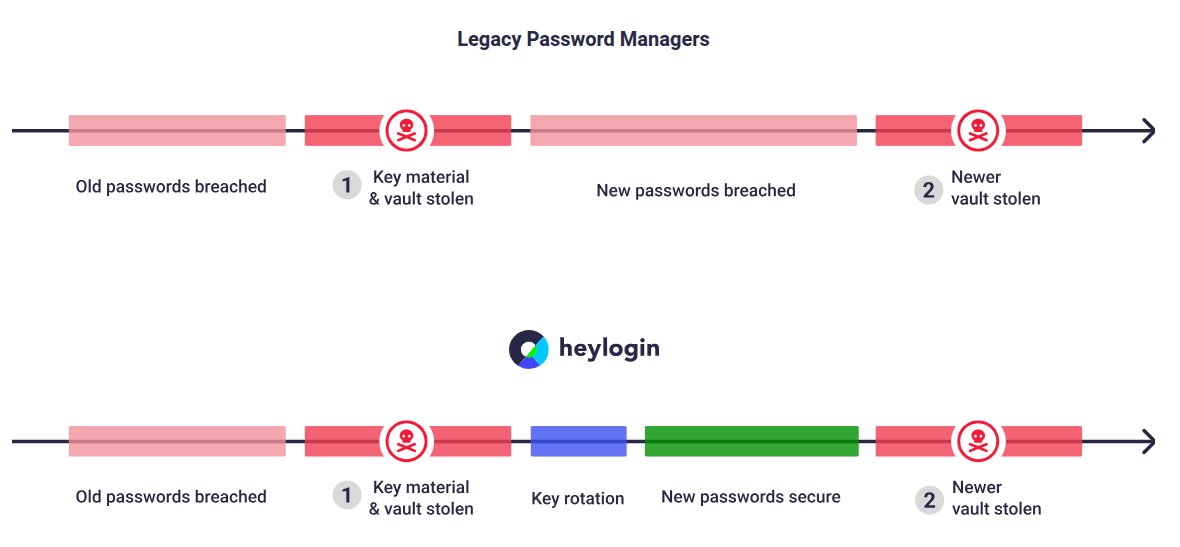
This is the technically most interesting finding. Imagine an attacker gains one-time access to your encrypted data and the matching key. With most password managers, every password you store afterwards is then compromised as soon as a copy of your vault is stolen again, because the key stays the same.
heylogin does this differently. We automatically re-encrypt your data after a change of keys, for example when a login device is removed. The technical term for this is post-compromise security. The effect: passwords you create anew after an incident remain protected, even if the old keys have fallen into the wrong hands.
In the FZI comparison table, exactly three of eleven products meet this point: KeePassXC, Keepass2Android and heylogin. And here is the difference: KeePassXC and Keepass2Android are local password managers, where re-encryption is technically simple. For a cloud-based manager that synchronizes your passwords across multiple devices, this is considerably more demanding. heylogin is therefore the only cloud password manager tested that offers post-compromise security. If you would like to read the details, you will find them in our Security Whitepaper in the section "Post-Compromise Security".
What we improved based on the test
An independent test is only worth as much as what you make of it. The report named a number of points, and we worked on them in several technical discussions with the FZI. This is what we have implemented since then:
Password quality now also in the private plan
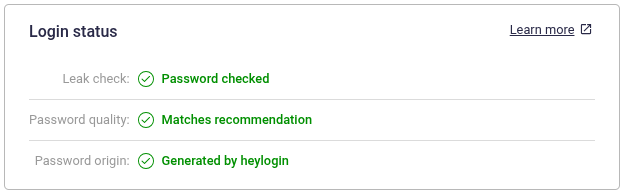
The report suggested assessing stored passwords for their quality. This feature, which we already offered for organizations, we have now introduced for private accounts as well. heylogin shows for each stored password whether it meets the recommendations.
The criteria are based on the BSI factsheet "Secure Passwords" and on NIST SP 800-63B. Since heylogin generates the passwords itself, with at least 16 characters and all four character types they are considerably stronger than the minimum these standards call for. This is complemented by an automatic check against known data leaks.
Shorter lock times
The test criticized that heylogin locks automatically only rather late in the default setting. We removed the longest option ("1 day"). The new maximum and default value is now 8 hours.
Important to understand: this time only runs during inactivity. Any action in the browser, scrolling, typing, switching a tab, resets the timer. The lock therefore only takes effect when a device is genuinely left unattended, not in the middle of work. A shorter value thus brings more security without disrupting everyday use.
Protection against screenshots
On Android, heylogin now prevents screenshots, including while a password is displayed in plain text. On iOS, the absence of a corresponding interface means there is no comparable risk.
Modernized encryption library
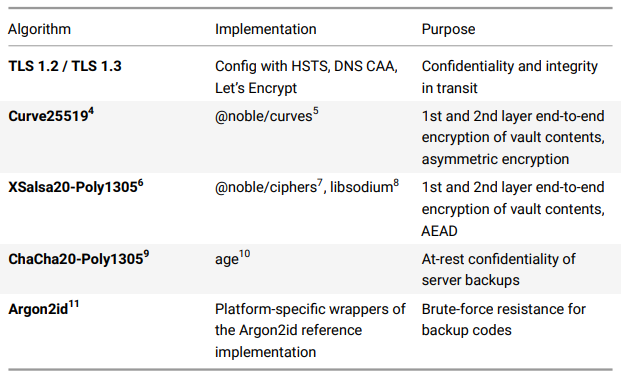
A more technical point: the report pointed out that a software library we use (TweetNaCl) had not received an update for some time. We replaced it with the actively maintained library "noble". This reduces the risk of so-called supply-chain attacks, in which attackers try to smuggle in malicious code via outdated building blocks. Details are in our Security Whitepaper, section 6.1.
In addition, over the course of 2027 we are working on publicly available SBOMs (a kind of parts list of all software components used), as part of our preparation for the European Cyber Resilience Act.
Two points we deliberately did not change
Honesty also means talking about the things you did not implement, and explaining why.
The clipboard on Android
The report notes that on Android, heylogin does not clear the clipboard itself when you copy a password manually. That is true, but the operating system handles it here: from Android 13 onwards, Android automatically clears the clipboard after a short time. The prerequisite is an Android version that still receives security updates, which is the basic requirement for a secure device anyway. The FZI itself refers to this mechanism in its comparison table.
Domain matching
This is the only point the FZI highlights as a central test finding, and it deserves an explanation. It concerns when heylogin suggests a stored login on a website.
heylogin also suggests a login on related subdomains. An example: if you have saved a login for dash.example.com, it is also suggested on auth.dash.example.com. The same applies across related domains, such as amazon.com and amazon.de. This is built deliberately, because it is a trade-off between security and usability.
Very strict matching would break all of these everyday cases. Users would then have to look up their passwords manually and copy them, and it is precisely this manual copying that is a security risk in its own right. What heylogin does prevent: the classic phishing trick of attaching the real domain as a prefix to a foreign address (example.com.evil.de) leads to no suggestion. And a login saved for a subdomain is not passed up to the parent domain.
That this is a fundamental design trade-off and not a heylogin-specific shortcoming is shown by a look at the BSI report itself: the FZI made the same finding there for 1Password, one of the most established password managers of all, with the same conclusion that no fundamental concerns speak against its use. How our matching works in detail is documented in our Website Matching help article.
Our understanding of security
For us, security does not mean having no points of criticism. It means having yourself independently assessed, speaking openly about the results, and explaining trade-offs in a comprehensible way. That is precisely why we are publishing not only this article, but the full documents. The FZI report and the BSI study are available in German only:
- FZI final report on the security assessment of heylogin (PDF, German)
- BSI study "IT security in the digital consumer market: Focus on password managers" (PDF, German)
- heylogin Security Whitepaper (PDF)
The three fears from the beginning, theft, loss of access, and provider access, are to be taken seriously. A good password manager should have a convincing answer to all three. We are convinced that heylogin does, and the FZI's test bears this out. But you do not have to take our word for it: read the report.